
A visual music website lets you approach sound through shapes instead of starting with sheet music. Play Music Theory explores that idea as a visual instrument. On anul.space, Sketchtone lets you draw music in your browser: make a mark, press Play, and hear where it lands.
What is Play Music Theory?
Play Music Theory, styled play_music_theory, is a visual instrument by Tala Rae Schlossberg. Its website offers an app link and a browser version. The browser interface lists musical controls including key, scale, quantization, swing, and WAV/MIDI export, alongside an upgrade option. Check that page for current feature access.
It was a reference for Sketchtone’s development. Sketchtone is our own Canvas and Web Audio implementation, not an official version of Play Music Theory and not affiliated with it. The two tools have different controls and capabilities.
Sketchtone: a musical drawing tool you can play with
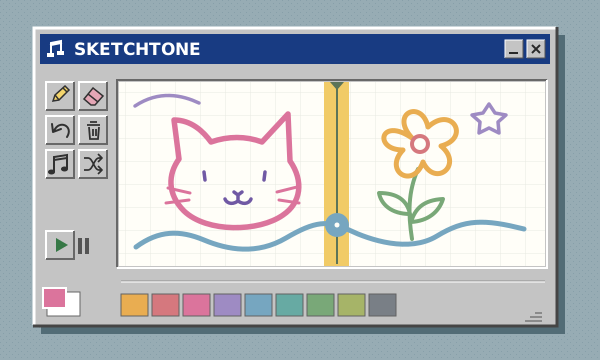
Sketchtone is free to use on the website, with no download or account. Think of it as a musical sketchbook rather than a game with levels or a score. Draw with a mouse or finger, then use Play to send a playhead across the page.
Left to right means earlier to later. Higher marks make higher notes. Marks at different heights but the same horizontal position can sound together.
Start in Simple mode with the drawing tools. Advanced reveals instruments, tempo, echo, and loop controls. You can change modes without losing your sketch. Notes snap to pitch rows and timing steps: tiny movements may sound the same, and nearby dots of the same pitch and instrument can combine into one note. These experiments describe Sketchtone’s controls, not the controls of the reference site.
1. Hear a melody rise and fall
Pitch is how high or low a note sounds. Place three dots from left to right, each clearly higher than the last. Press Play and listen for the rising pattern. Now try three dots that descend.
You have made two simple melodic shapes without naming a note. Try a rise followed by a fall, or repeat one height before jumping upward. Keep the gaps between dots similar so you can concentrate on pitch.
Sketchtone uses a fixed C-major pentatonic palette: C, D, E, G, and A, repeated across its pitch range. It does not include every chromatic note or let you select another scale. A sloping line becomes a sequence of stepped pitches, not a continuous slide.
2. Make room for rhythm
Rhythm is the pattern of sounds and silences in time. Draw four separate dots at the same height, spaced evenly across part of the canvas. Then erase a dot or try a pattern with two close together and a larger gap afterward.
The height stayed the same, but the timing changed. Empty horizontal space gives the phrase room to breathe. Listen to the pattern repeat before adding more marks.
In Sketchtone, a horizontal stroke retriggers notes at successive timing steps. Compare one dot with a horizontal line spanning several timing steps at the same height: the line creates repeated notes. Use separate dots and gaps when you want to hear a rhythm clearly.
3. Put notes together
Place two dots at clearly different heights but the same left-to-right position. They should sound together. Add a third at another height to hear a three-note chord, then try a different spacing between the heights.
For a useful comparison, draw those same heights at separate horizontal positions later in the loop. First you hear the pitches together; later you hear them one after another. Use individual dots for this experiment: a vertical stroke contributes its endpoint pitches, not every note along the line.
4. Keep the notes, change the tempo
Tempo is the pace of the beat, measured in beats per minute. Switch to Advanced and compare the same sketch at 80 BPM and 140 BPM. The second version plays faster, but the pitches you chose stay the same.
Change just this one setting and listen to how the phrase feels. Sketchtone supports 60–180 BPM. Play/Pause keeps your position, so you can pause while editing; on a keyboard, Escape stops and rewinds.
5. Change the instrument, not the ink
Timbre is a sound’s character: the difference between two instruments playing the same pitch. In Advanced mode, choose Keys and draw a few dots. Then choose Bell and add dots at matching heights later in the loop. Listen to the two versions in turn.
The eight synthesized instruments are Keys, Pluck, Bell, Bass, Flute, Marimba, Strings, and Synth. Choose an instrument before drawing: existing strokes keep the sound they were drawn with.
Ink is separate from sound. You can draw Keys and Bell in the same color, or use different colors for two Keys phrases. Changing an ink color does not change pitch or switch instruments.
A playful introduction, not a complete theory course
These experiments give you something concrete to listen for: rising pitch, unequal gaps, simultaneous notes, faster beats, and different instrument sounds. They are a way to explore basic musical relationships, not a promise of mastering music theory.
Sketchtone does not teach staff notation, identify chord names, record a microphone, or export audio or MIDI. Its fixed note palette also makes it different from a full keyboard or composition workstation. For the experiments here, the useful habit is simple: change one thing, play it again, and notice what you hear.
Try making a tiny phrase you like, then leave some space around it. You can erase part of a stroke or use Undo while you experiment. There is no score to chase and no correct picture to draw.
Draw your first melody in SketchtoneOpen the musical sketchbook. Start with three dots and press Play.→Looking for a different kind of short experiment? Explore our guide to quick browser games or head back to all games on anul.space.